You "win" NaGaDemon if you make a game and play it. My RPG game has not progressed that much sins my last post and I can not really claim to have played a complete game at this point, so I guess I kind of lost.
However!
I also won! Wohoo! Because I went from "I would like to do this" to "This is what I'm doing" ad for me that is a really big change. And also, just because NaGaDemon is over does not mean that the game is over. I will complete this game/engine. My end goal is to publish at least one game in the Android Market using this engine. Either free or paid(or both?). I know how to do it, I know it can be done and I really want to do it. So thats's it: I will do it! :)
So what was the end result? Well, basically I'm at the point of the last post with the addition that when the player is thrown into the battle screen: there are 2 enemies there that starts tracking you by closing in one step each time you move. And once they get next to you, they attack you and you usually die. An by usually I mean always. There is rudimentary support for adding weapons and armour into the battle calculations but none exist.
So in short: I'm not done. There is a few things left to make it a "game". There are a lot of things left to make it a game. I will do a lot of things.
A fun month! I will do it again!
Showing posts with label rpg. Show all posts
Showing posts with label rpg. Show all posts
Thursday, 1 December 2011

Tuesday, 22 November 2011
Terrible pace
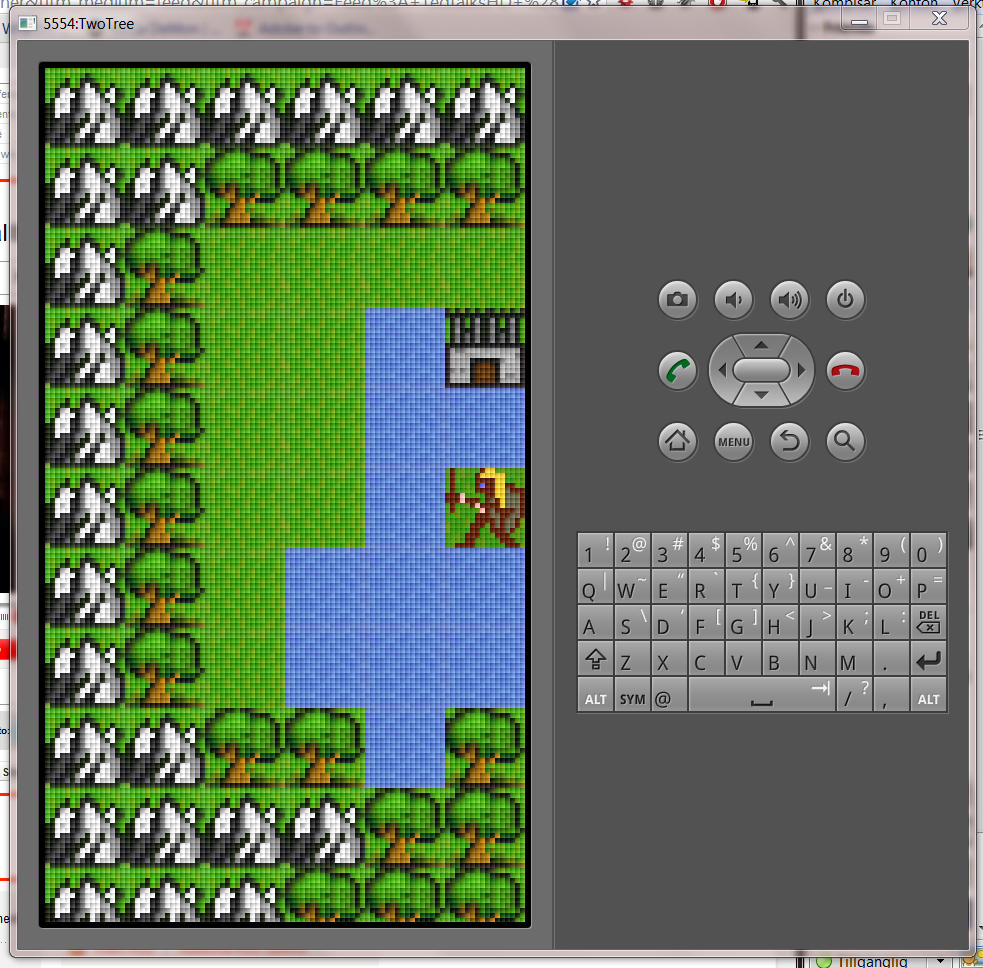 I've had such a terribly slow progress lately that this blog looks like it belongs to Stoffe. So terrible in fact that I just had to post for the most minuscule of triumphs. After battling with the Bitmap class for way too long and finally realizing that I was a terrible programmer, not that the Bitmap class was terribly implemented: I finally managed to create the pixel-upscale that I wanted.
The tiles in the image here are 16*16 with a pixel-size of 5*5. It is a bit too big naturally, but I thought it would make a better screenshot. I guess a typical pixel size for the final game would probably be 3*3 on a mid range screen.
The image is a bit crushed in this post, so click it to see the original if you want to see a more realistic view of the scaling in action.
Tuesday, 15 November 2011
Damn you Android pixels!
In a week my progress is this: I can now draw pixels. <tired Monthy Python cheering>Yay</ tired Monthy Python cheering>... Naturally I could draw pixels from square one(arf arf) but the problem is that any attempt to draw into a Bitmap and get a 1:1 relation between the bitmap pixels and the physical screen pixels seemed to be beyond me. OK, I did not work for a week before solving this, it was more like 3 hours but as I had to leave the problem unsolved for a couple of days to get on with life, it kind of felt like a week.
So how hard can it be? Well it was a bit trickier than expected. What I wanted was to load a PNG containing some 16x16 tiles of mountains, lakes, plains and so on and to draw a map. But Android is very helpful and re-sizes stuff automatically to fit your screen size and your screen density. This is normally very helpful unless you want to do the exact thing I wanted. That is: complete control on the pixel level. So after a lot of googling I found that the following 2 things fixed my problems:
- In the manifest XML file, add the following:
<supports-screens android:anyDensity="true" />
(this is a really bad idea for most apps as it turns off a lot of automagic "under the hood" stuff that is designed to make your life simpler in most cases. Read the anyDensity documentation here) - When loading the PNG (even from the "drawable-nodpi" folder) the Bitmap was scaled after load was completed(24x24 instead of the expected 16x16). To correct this I had to pass in an extra parameter to the BitmapFactory:
BitmapFactory.Options opts = new BitmapFactory.Options();
opts.inScaled = false;
Bitmap tiles = BitmapFactory.decodeResource(res, R.raw.tiles, opts);
And so now my pixels are ending up where they're supposed to.
 |
| And before I create the "Pixel re-size" functionality, everything will be reeeeally small(this image on a recent phone is reeeeally small as the DPI is a lot higher than on a laptop/desktop computer). |
Subscribe to:
Posts (Atom)